Payroll Expense Management Dashboard in Excel
Most companies view payroll as a line-item expense — and lose their strategic advantage in doing so. When you treat every payment as an investment in human capital, the picture changes: you gain visibility into returns, trends, and control. That's exactly what the salary investment efficiency dashboard is built for. It's a tool that transforms a salary spreadsheet into an analytical growth map for your team.
How to Turn Payroll from an Expense into a Company Asset Using Excel
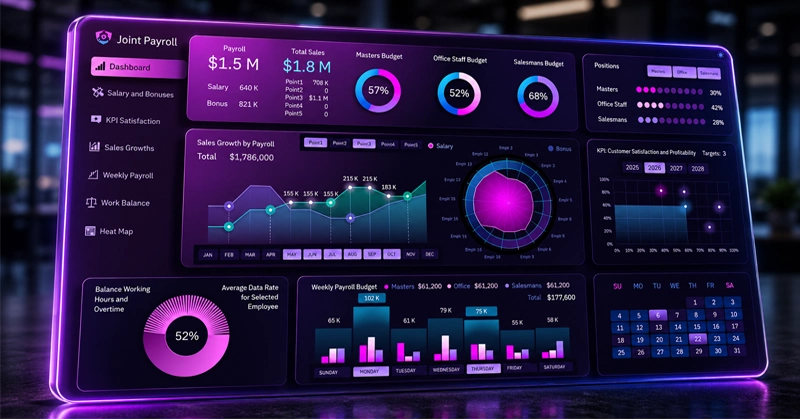
Excel dashboard example: payroll budget allocation by department, cost dynamics, and per-employee ROI — all in one screen.
What the dashboard shows: from the cost per hour to the return on your invested budget. You can build this kind of dashboard in Excel yourself. To help you do that, we offer a tutorial video and a ready-made example file for hands-on exploration of all the underlying principles.
This tutorial video walks you through every step of building the dashboard template:
- Designing the dashboard grid layout in Excel
- Main menu structure of the dashboard
- Processing source data and setting up the pivot table
- Data table for radar chart distribution
- Building a custom radar chart in Excel
- How to add chart control buttons
- Multi-layer line chart with growth signal oscillators
- Employee satisfaction goal achievement chart
- Combined bar chart for weekly payroll budget
- Payroll budget spending indicators
- Building a custom horizontal bar chart in Excel
- Building a custom pie chart for balance analysis
- How to create an interactive heat map in Excel
- Final presentation of the payroll dashboard
To understand the purpose of each chart and the principles behind using them in practice, refer to the guide below:
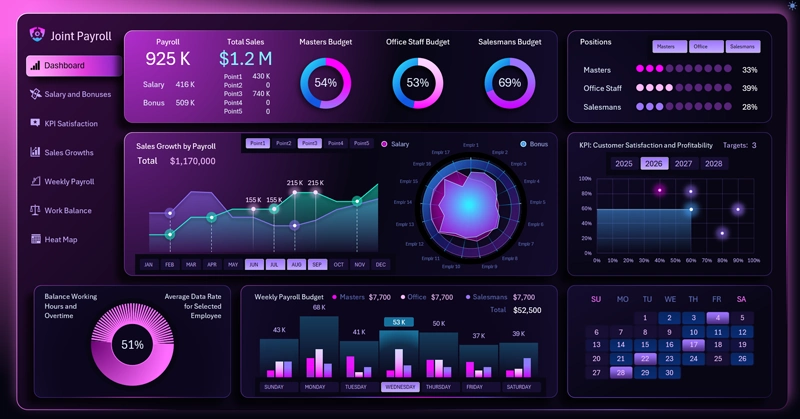
Key Benefits of the Excel Payroll Analysis Dashboard
The Excel workforce investment dashboard is more than just a visualization of salaries. It's a shift in management thinking: instead of asking "how much are we spending on people?", you start asking "how much does every dollar invested bring us?" Companies that have adopted this approach identify growth opportunities faster, plan hiring more accurately, and retain key employees before they start looking elsewhere. Start with a simple template — and you'll be surprised how transparent your team becomes within just one reporting period.
 Download the Payroll Expense Management Dashboard in Excel
Data Visualization Charts for Interactive Report Creation in Excel.
Dashboard Templates